Cleanup rules
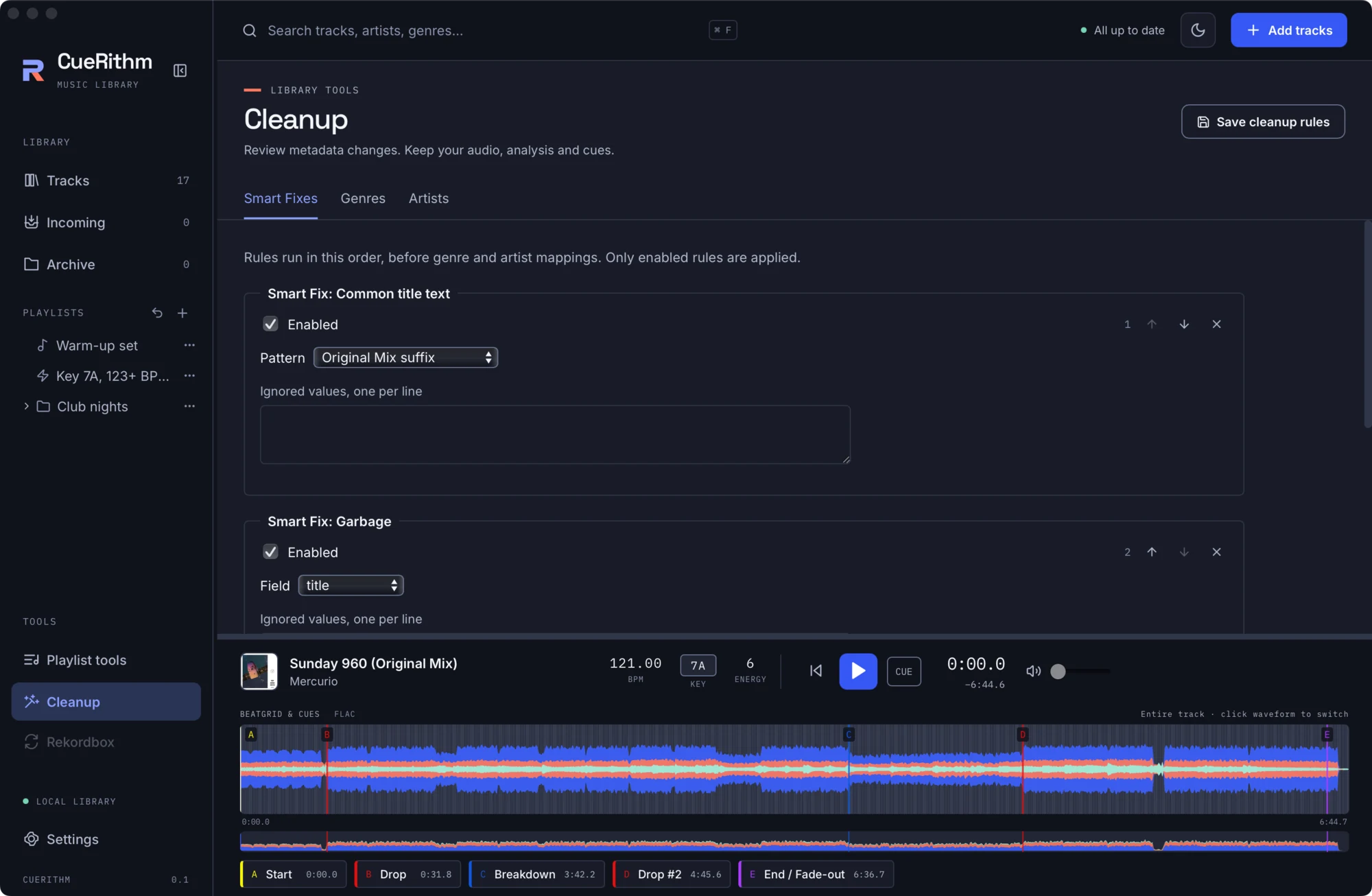
Cleanup edits human-readable metadata (title, artist, album, genre, comment and similar). It never changes audio, analysis, key, BPM, beatgrid, energy, paths or cues. The tool and the automatic Incoming step share one rule set.
The flow
- Edit rules and press Save cleanup rules. A scan is blocked while there are unsaved changes (Save rule changes before scanning.).
- Scan tracks. Scanning previews changes without writing file tags.
- Review. N proposed changes, X unchanged · Y unavailable, a Select all proposals checkbox and one card per track with before and after.
- Apply N changes. Applying cleanup… then A applied · U unchanged · C conflicts · F failed.
- Undo from the history.
Scope is All ready tracks or N selected tracks. Only ready, non-archived tracks are in scope (up to 100,000 at once). Editing rules or scope discards the previous preview.
What apply guarantees
- File tags and library metadata are written together, with a durable backup of the original.
- Decoded audio, key, BPM, beatgrid, energy and existing cue history are preserved.
- If nothing physical changes, the file is not rewritten.
- Unrepresentable metadata, a file that changed since the scan, or a concurrent edit is reported per track. Other tracks still complete, and conflicting tracks need a fresh scan.
- Undo restores the original file bytes and metadata when the file still matches what the apply produced. Newer edits are preserved and reported as conflicts. Undo survives restarts.
- Custom (categorised) tags live in CueRithm's library, not in file tags.
Smart Fixes
An ordered list of up to 64 rules. Rules run in this order, before genre and artist mappings. Only enabled rules are applied. No rules are preinstalled. Add one with New Smart Fix and Add Smart Fix. Each rule has Enabled, Move up, Move down, Remove rule, its options, and Ignored values (one per line, exact whole-value matches that the rule skips).
| # | Fix | Options and behaviour |
|---|---|---|
| 1 | Casing | A field. Uppercase values and Lowercase values (both on by default) convert fully upper- or lower-case values to title case. Mixed-case values are skipped. Acronyms are preserved. |
| 2 | Characters to spaces | Characters (default _, up to 64). Replaces each listed character in the title with a space and trims the edges. |
| 3 | Encoded characters | Decodes HTML-style entities in the title (numeric and nested, with bounded work). |
| 4 | Extract artist | Separator (default -, 1 to 64 characters) and Result number (1 to 256, default 1). When Artist is empty, takes that part of the Title as the artist and shortens the title. |
| 5 | Extract remixer | Remixer suffix (default remix) and Remove remixer from title (on by default). When Remixer is empty, takes the name before the suffix. Generic mix names are excluded. |
| 6 | Garbage | A field. Removes repeated spaces, edge punctuation and empty brackets. Safe to run twice. |
| 7 | Number prefix | Removes leading track-number prefixes from the title. |
| 8 | URLs and email | A field and Clear entire matching field. Removes URLs and complete email addresses, keeping bare audio file names. |
| 9 | Mix parentheses | Wraps a trailing mix or version description in parentheses, respecting an open parenthesis. |
| 10 | Common title text | Pattern: Original Mix suffix (default), Camelot key, Camelot key and energy, BPM suffix. |
| 11 | Promotional text | A field. Removes bracketed promos, "premiere" prefixes and promotional or provenance tails. |
Fixes with a field choice offer: title, artist, album, album artist, genre, comment, grouping, label, remixer, mix, producer, composer, lyricist. The others act on the title. A fix that would empty a value does not blank it.
Genres
Enable Genre cleanup to standardise spelling.
- Map exact values: Exact source value to Canonical value, with a Remove checkbox to delete a value. Chains are followed to the end, cycles are rejected and duplicates collapse.
- Protected genres, one per line, remain unchanged.
- Convert genres into categorized tags: a Category (default Subgenres), the Genres to convert, and Remove converted values from Genre.
- A library value list with counts, Search genres, sorting by name or track count, a per-value Replace … with field and a Protect checkbox, plus Refresh values.
Artists
Enable Artist cleanup and choose the roles it covers: artist, remixer, producer, composer, lyricist (artist only by default; at least one when enabled). The same mapping, protected-value and value-list editors apply, with counts per role. Names containing commas stay one value if the file stores them that way, and similar spellings are never merged on their own.
Order of application
All enabled Smart Fixes in list order, then genre conversion and mapping, then artist mapping. Values used as mapping sources or targets are protected from text fixes in their roles.
Limits
64 fixes. Ignored and protected values at most 4,096 each, each at most 4,096 UTF-8 bytes. At most 4,096 mappings, with no duplicates or cycles. Per track at most 128 values per field, 1 MiB total and 4,096 custom tags. Violations are shown in a banner before saving.
Automatic cleanup
In Settings > Cleanup, Clean incoming tracks automatically applies the saved rules after catalog tagging and before the track enters Tracks. Changing rules never rewrites tracks that are already complete. Cleanup never contacts a provider.
Backups
Originals are kept until a retention action exists, and that action is not yet built. The size is shown in Settings > Automatic tagging as Recovery backups.